
Outline Activities First
Many of HeavyBid users do not use an Activity codebook. Nothing wrong with that but creating one activity at a time you can get lost in the forest because of the trees. Create an outline first of your activities than proceed with filling in the details. First just click on the three-dot box for the activity dialog box in the Tree View or at the lower left hand corner click on the “Add Activities” button.
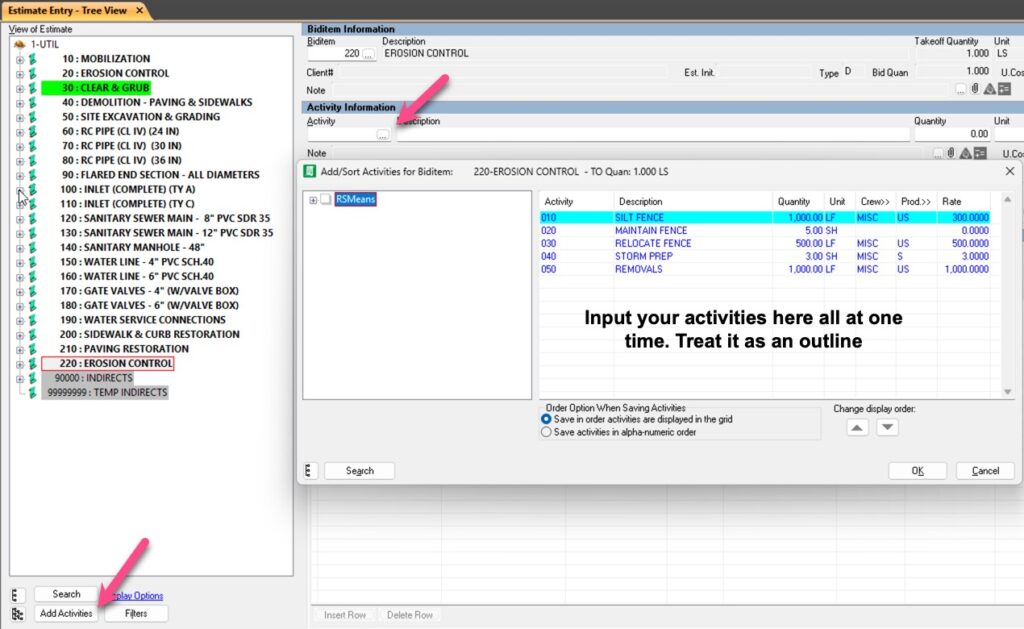
Once on the popup just outline your activities. As an option you can add crew-prod factor-productivity rate but you can also wait and do it on the main tree view screen. As a side note I like to keep my activities generic so for every biditem I use the sequence 010,020,030 so that way if I copy an activity I don’t have to change the activity code. Try this feature out. This also works if you have an activity codebook.

HeavyBid – Basics and Beyond is devoted to everything HCSS HeavyBid and estimating. Updated regularly with helpful insights and tools of the trade, this blog is designed to make your estimating easier and more successful.